顯示具有 Processing for Android 標籤的文章。 顯示所有文章

2013年10月1日 星期二

安裝 Processing for Android

1.先到Android Developer官網下載SDK工具包,解壓縮後執行/tools/android

2.再到Processing官網下載Processing,覺得好用的話,下次下載時可考慮捐點錢

3.解壓縮後,執行./processing,此時只支援標準的Java mode

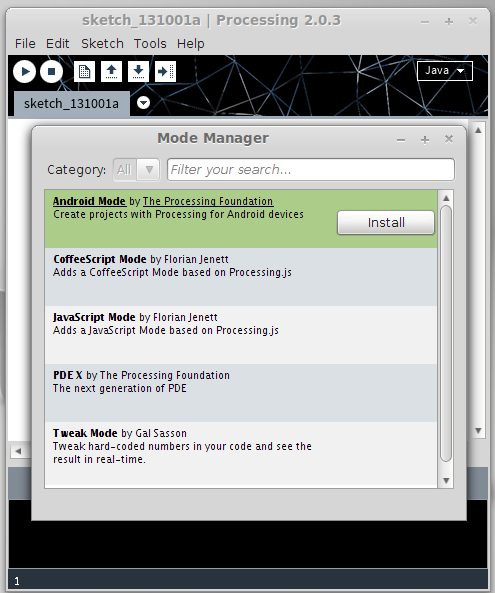
4.在Mode Manager裡,選擇Install Android Mode

5.順利的話,幾分鐘就可安裝完畢

6.回到主畫面,準備切換到Android mode

7.在Linux,Processing可能會找不到Android SDK,會詢問是否手動加入Android SDK路徑

8.選擇開頭下載SDK工具包,解壓縮後的檔案路徑

2013年7月2日 星期二

[ Processing for Android ] A Simple TouchMotion example

import processing.core.*; 
import processing.data.*; 
import processing.event.*; 
import processing.opengl.*; 

import android.view.MotionEvent; 

import java.util.HashMap; 
import java.util.ArrayList; 
import java.io.*;

public class TestTouchMotion extends PApplet {

public void setup() {
 

  orientation(PORTRAIT);
  stroke(255);
  smooth();

}

public void draw() {
  background(0);
}

public void showCircle(float x, float y, float siz) {
  int circleSize = 500;
  float diameter = circleSize * siz;
  noFill();
  strokeWeight(20);
  colorMode(RGB, 255);
  stroke(PApplet.parseInt(random(0,255)),PApplet.parseInt(random(0,255)),PApplet.parseInt(random(0,255)));
  ellipse(x, y, diameter, diameter);
  fill(0,255,0);
  ellipse(x, y, 8, 8);
}

public boolean dispatchTouchEvent(MotionEvent me) {
  int numPointers = me.getPointerCount();
  for(int i=0; i < numPointers; i++) {
    int pointerId = me.getPointerId(i);
    float x = me.getX(i);
    float y = me.getY(i);
    float siz = me.getSize(i);
    showCircle(x, y, siz);
  }
  return super.dispatchTouchEvent(me);
}


  public int sketchWidth() { return displayWidth; }
  public int sketchHeight() { return displayHeight; }
}

2013年6月29日 星期六

[ Processing for Android ] A Simple Thread example

package processing.test.threadexample;

import processing.core.*; 
import processing.data.*; 
import processing.event.*; 
import processing.opengl.*; 

import java.util.HashMap; 
import java.util.ArrayList; 
import java.io.*;

public class ThreadExample extends PApplet {


// A Simple Thread example


CountdownThread a_thread;
CountdownThread b_thread;
CountdownThread c_thread;

public void setup() {
  orientation(PORTRAIT);
 
  textSize(35);
  a_thread = new CountdownThread(1000,10);
  a_thread.start();
  
  b_thread = new CountdownThread(1000,100);
  b_thread.start();
  
  c_thread = new CountdownThread(1000,1000);
  c_thread.start();

}

public void draw() {
  
  background(255);
  fill(0);
  
  int a = a_thread.getCount();
  text("Count down : "+a,10,50);
  
  int b = b_thread.getCount();
  text("Count down : "+b,10,200);
  
  int c = c_thread.getCount();
  text("Count down : "+c,10,350);  
}

class CountdownThread extends Thread {
  
    int wait;   // How many milliseconds
    int count;  // counter
    
    CountdownThread (int w, int c) {
    wait = w;
    count = c;
  }
  
    public int getCount() {
    return count;
  }
  
    // Overriding "start()"
    public void start () {
    super.start();
  }
  
    public void run () {
    while (count > 0) {
      count--;
      try {
        sleep((long)(wait));
      } catch (Exception e) {
      }
    }
    quit();
  }
  
  // the method that quits the thread
  public void quit() {
    interrupt();
  }
}

  public int sketchWidth() { return 500; }
  public int sketchHeight() { return 500; }
}

2013年6月22日 星期六

[ Processing for Android ] fisica 2D 物理系統

import processing.core.*; 
import processing.data.*; 
import processing.event.*; 
import processing.opengl.*; 

import fisica.*; 

import java.util.*; 
import java.io.*;  

public class Pipe extends PApplet {

FWorld world;

public void setup() {
 
  smooth();

  Fisica.init(this);

  world = new FWorld();
  world.setGravity(0, -300);


  FPoly l = new FPoly();
  l.vertex(width/4, 0);
  l.vertex(0, 0);
  l.vertex(0, height);

  l.vertex(width/4, height);
  l.vertex(width/4, 7*height/10);
  l.vertex(width/2, 7*height/10);
  l.vertex(width/2, 3*height/10);
  l.vertex(width/4, 3*height/10);
  l.setStatic(true);
  l.setFill(0);
  l.setFriction(0);
  world.add(l);

  FPoly r = new FPoly();
  r.vertex(width/4+60, 0);
  r.vertex(width, 0);
  r.vertex(width, height);

  r.vertex(width/4+60, height);
  r.vertex(width/4+60, 7*height/10+60);
  r.vertex(width/2+60, 7*height/10+60);
  r.vertex(width/2+60, 3*height/10-60);
  r.vertex(width/4+60, 3*height/10-60);
  r.setStatic(true);
  r.setFill(0);
  r.setFriction(0);
  world.add(r);
}

public void draw() {
  background(80, 120, 200);

  if ((frameCount % 40) == 1) {
    FBlob b = new FBlob();
    float s = random(30, 40);
    b.setAsCircle(width/4+20, height-random(100), s, 20);
    
    b.setStroke(0);
    b.setStrokeWeight(2);
    b.setFill(255);
    b.setFriction(0);
    world.add(b);
  }

  world.step();
  world.draw();
}

  public int sketchWidth() { return 400; }
  public int sketchHeight() { return 400; }
}